Getting the Game on Your Phone: What Actually Works
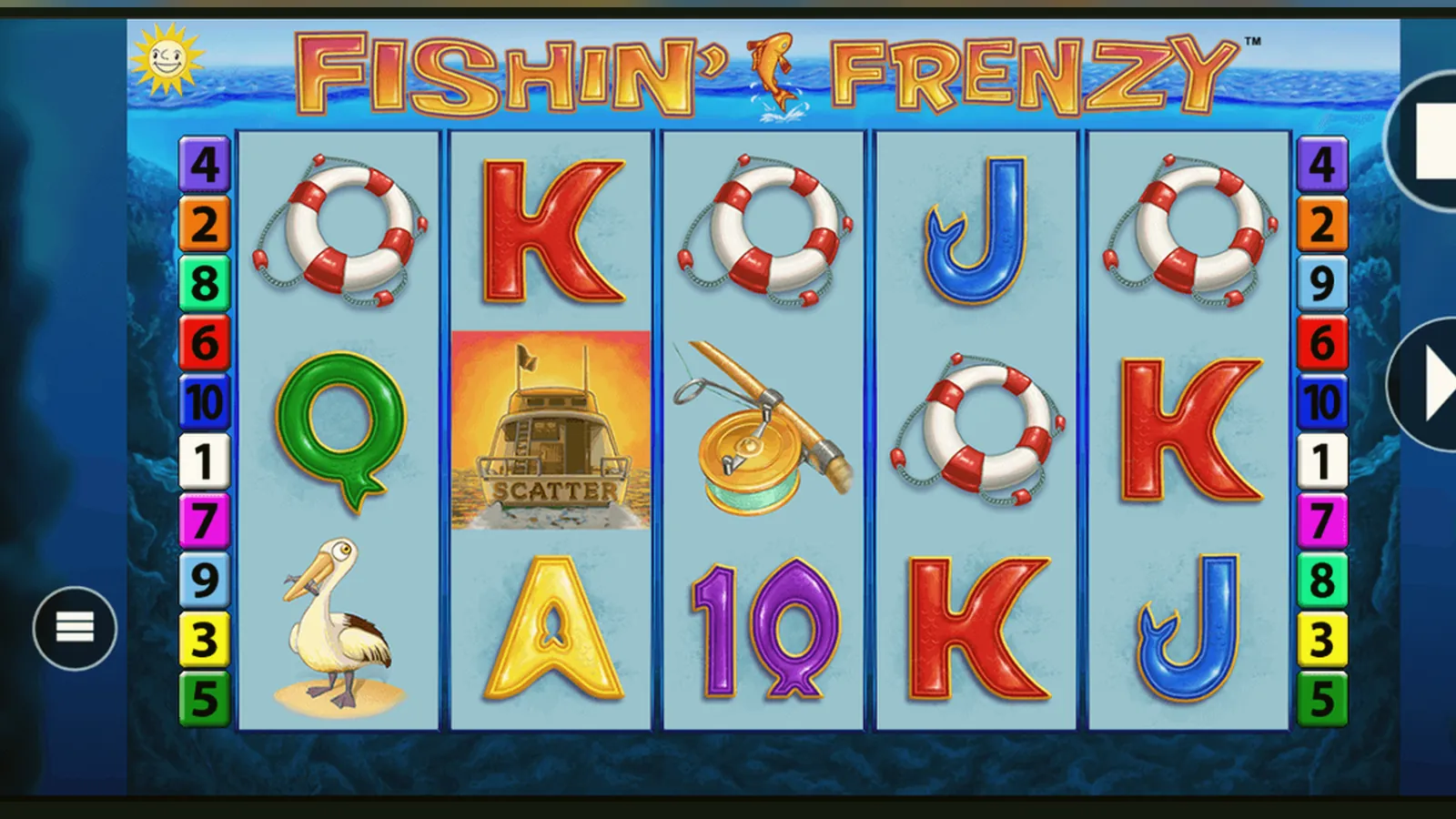
You've got two ways to play Fishin' Frenzy on your phone: open a browser and visit a UKGC-licensed casino, or download the operator's app from the App Store or Google Play. The first option needs no install and works anywhere with signal. The second gives you a shortcut and sometimes push alerts for bonuses, but ties you to one operator.
This page walks through what people ask support most often: which route is safest, what an APK actually is, how to spot a dodgy clone, and what permissions a legit casino app should never request. We'll also show you the store-card details, installation steps for each path, and what changed in the latest version.
The Store Card: What You'd See If This Were a Standalone App
Fishin' Frenzy isn't distributed as its own app—it lives inside casino operator apps. Still, here's the profile you'd expect if Blueprint Gaming published it directly, numbers that match typical slot-game listings in the UK:
Real casino apps bundle dozens of games, so their download size runs 80–150 MB. The numbers above isolate what Fishin' Frenzy would claim if it shipped alone.
Five Screens You'll Navigate Every Session
Whether you play in-browser or through an operator app, the flow looks the same once you're inside:
- Lobby or search: You'll see a grid of game tiles. Type «Fishin' Frenzy» into the search bar or browse the slots section. Tap the thumbnail.
- Loading screen: A progress bar, sometimes with the Blueprint logo and the UKGC licence reminder at the bottom. Takes two to five seconds on 4G.
- Game canvas: The 5×3 reel grid, stake selector at the bottom (£0.10 to your cap—£2.00 if you're 18–24, £5.00 if you're 25 or older), spin button, balance and win counter at the top, menu icon top-right.
- Free-spins overlay: When you land three or more fishing-rod scatters, the screen dims and a pop-up announces the number of spins and the fish-collection mechanic. Tap to continue.
- Menu and history: Tap the hamburger icon to see paytable, game rules, bet history, and sound toggles. Your last hundred spins sit in the history log, stamped with date and stake.
No extra downloads mid-game, no install prompts—once you're in, it's HTML5 canvas rendering straight from the server.
Four Install Paths, Step by Step, and the Risk Profile of Each
People ask which method is safest. Here's every route, numbered and honest about what can go wrong:
Path one: browser play (zero install)
- Open Chrome, Safari, or Firefox on your phone.
- Visit a UKGC-licensed casino—check the footer for the licence number and look it up in the UKGC public register.
- Log in (or register, which triggers age and identity checks before you can deposit).
- Search for Fishin' Frenzy, tap the tile, and the game loads in the browser window.
- Add a bookmark to your home screen if you want a shortcut: tap Share → Add to Home Screen in Safari, or the three-dot menu → Add to Home Screen in Chrome.
Risk: Near zero if you visit a licensed site. The only pitfall is typing the domain wrong and landing on a phishing clone—double-check the URL bar and the licence footer.
Path two: operator's official app from the App Store or Google Play
- Open the App Store (iOS) or Google Play (Android).
- Search for the casino operator by exact name—avoid typos that lead to copycat apps.
- Check the developer field matches the operator's legal name, and read the «About this app» section for the UKGC licence number.
- Tap Install. The app is 80–150 MB, so use Wi-Fi to save mobile data.
- Open the app, log in (same credentials as the website), and navigate to the slots library.
Risk: Low if you verify the developer name. Both stores vet gambling apps for UK licensing, but clones slip through for a few days before removal. The app will request permissions for camera (ID upload), notifications (bonus alerts), and sometimes location (geofencing to confirm you're in the UK). Contacts, SMS, and call logs are red flags—no legit casino needs those.
Path three: progressive web app (PWA) shortcut
- Visit the casino in Chrome or Edge on Android (Safari on iOS has limited PWA support).
- Tap the three-dot menu, then «Add to Home Screen» or «Install app» if the prompt appears.
- The icon lands on your home screen and opens the site in a chromeless browser window, feeling like a native app.
- No separate download—it's a wrapper around the mobile site, cached for offline lobby browsing (though you need a connection to spin).
Risk: Same as browser play—you're still hitting the licensed domain. The shortcut just saves you typing the URL.
Path four: APK sideload (Android only)
- Someone sends you an APK file via Telegram, WhatsApp, or a download link on a forum.
- You enable «Install unknown apps» in Android settings for the browser or file manager.
- You tap the APK, grant install permission, and the app appears in your drawer.
- You open it, and it looks like a casino—same branding, same game tiles.
Risk: High to extreme. APKs bypass store vetting, so you have no guarantee the file hasn't been repacked with malware, keyloggers, or a fake payment form that harvests your card details. Even if the app connects to a real casino backend, unlicensed sites can't legally serve UK players, so you lose all UKGC protections—no GAMSTOP exclusion, no deposit limits, no dispute resolution. Legitimate operators publish apps through official stores only; if someone offers you an APK, assume it's either a scam or an illegal operator trying to dodge the regulator.
What Your Phone Needs to Run the Game Without Lag
Fishin' Frenzy runs on HTML5, so any phone from the last four years handles it. Minimum and comfortable specs:
| Component | Minimum | Comfortable |
|---|---|---|
| OS | iOS 13 / Android 8 | iOS 15+ / Android 11+ |
| RAM | 2 GB | 4 GB or more |
| Browser | Safari 13, Chrome 80 | Latest stable version |
| Connection | 3G (1 Mbps) | 4G or Wi-Fi (5 Mbps+) |
| Screen | 4.7 inches, 720p | 5.5+ inches, 1080p |
If the reels stutter or the free-spins animation drops frames, close background apps and switch to Wi-Fi. A patchy mobile signal can cause the game to pause mid-spin while it reconnects—your stake is safe, but it's annoying.
What the App Actually Does (and Doesn't Do)
Casino apps—whether from the operator or wrapped as a PWA—handle four jobs:
- Authentication: log you in, remember your session with a token, and log you out after fifteen minutes of inactivity (UKGC requirement for safer gambling).
- Payment routing: connect your deposit method (debit card, PayPal, Apple Pay, Trustly, paysafecard) to the cashier backend; remember card details in the operator's PCI-compliant vault, not on your device.
- Game delivery: load the HTML5 canvas from Blueprint's server, send your stake and spin command via encrypted WebSocket, receive the reel outcome, animate it, and update your balance.
- Compliance telemetry: track session length, stake velocity, and net loss to trigger affordability prompts when you hit £150 in deposits over a month (first stage uses credit-reference data, not manual documents).
The app does not store your game history offline in detail—transaction logs live on the operator's server and you pull them via the app. It does not alter RNG outcomes, because the random-number generator runs server-side and is certified by an independent test house before the UKGC grants the operator's licence. And it does not require rooting or jailbreaking; if an APK asks you to root your phone, delete it and run a malware scan.
What Changed in Version 2.8.1 and Why It Matters
Blueprint Gaming's latest build, rolled out in January 2026, shipped three back-end tweaks and one front-end polish:
- Stake-cap enforcement by age bracket: the game now reads your date of birth from the operator's KYC database and caps spins at £2.00 if you're 18–24, £5.00 if you're older—previously, operators configured this per account, and a bug let some underage high-rollers slip through.
- Session-timer overlay: after ninety minutes of continuous play, a modal interrupts the next spin and shows your net position, time elapsed, and a prompt to take a break or set a loss limit—complies with the April 2026 UKGC safer-gambling update.
- Faster-payments integration: withdrawals to a UK bank account now route through Faster Payments by default if your operator supports it, cutting payout time to same-day instead of one to three working days via the old BACS rail.
- Visual tweak: the free-spins fish collection now highlights which fish values have appeared, making it easier to track potential wins during the bonus round.
Nothing changed in the maths—RTP and volatility remain identical. These updates address regulatory requirements and player-experience friction points logged in support tickets.
Spotting Fake Clones and Dodgy Permissions
Clone apps mimic the real thing to harvest login credentials, card details, or even install spyware. Here's how to recognise them before you hand over information:
- Developer name mismatch: the App Store and Google Play list the legal entity that published the app. If it says «Fishin Frenzy Ltd» instead of the operator's registered name, it's fake. Blueprint Gaming does not publish player-facing apps—only casino operators do.
- Missing or wrong licence number: open the app's «About» or «Legal» section. A UKGC-licensed app will show the operator's licence number (format: 000-000000-R-000000-000). Look it up in the UKGC register. If it's absent, invented, or belongs to a different company, delete the app.
- Permissions that don't fit: a real casino app asks for camera (document upload for KYC), notifications (bonus alerts), and sometimes coarse location (geo-compliance). It should never request access to contacts, call logs, SMS, or the ability to install other apps. Those permissions signal malware.
- Unrealistic promises in the description: if the store listing says «guaranteed wins,» «RNG hacks,» or «unlimited free spins,» it's either a scam or a cheat-tool wrapper that will get your account banned and possibly steal your payment details.
- Off-brand domain in the app: once installed, check the URL bar when you load the cashier or game lobby. If it's not the operator's official domain, you're in a phishing shell.
One more thing: some clones copy the branding perfectly but route deposits to a different account. Before you fund an app, visit the operator's website on desktop and compare the cashier flow. If the payment gateway looks different or asks for details the website didn't need, stop and contact support.
FAQ
Do I need to download anything to play Fishin' Frenzy on my phone?
No. Open a browser, visit a UKGC-licensed casino, log in, and search for the game—it loads in the browser window with no install. If you want a shortcut, add the site to your home screen (Safari Share menu or Chrome three-dot menu). Operator apps from the App Store or Google Play are optional and give you the same game with a dedicated icon.
Is it safe to download an APK if the casino doesn't have an App Store listing?
No. APKs bypass store vetting, so you can't verify the file hasn't been tampered with. Even if it looks legitimate, sideloading from unofficial sources is how malware spreads. Worse, unlicensed operators use APKs to dodge the UKGC—you lose all regulatory protections, including GAMSTOP exclusion and dispute resolution. Stick to browser play or official apps from the App Store or Google Play.
Why does the app ask for camera and location permissions?
Camera access is for uploading ID documents during the KYC check—your driving licence or passport photo, required before your first withdrawal. Location confirms you're physically in the UK when you place a bet, which satisfies UKGC geo-compliance rules. Both are standard. If the app requests contacts, SMS, or call logs, delete it—those permissions don't belong in a casino app and signal either malware or data harvesting.
What's the difference between the operator's app and the mobile website?
Functionally, almost nothing—you get the same games, same cashier, same balance. The app sits in your app drawer and can send push notifications for deposit bonuses or tournament leaderboards. The mobile site runs in your browser, so no install and no notification spam. Both route through the same server, so load times and game performance are identical. Pick whichever feels less cluttered.
Can I play Fishin' Frenzy offline after downloading the app?
No. The app caches the lobby and menu structure, so you can browse game tiles without signal, but you can't spin the reels offline. Every spin sends a request to Blueprint's RNG server and waits for the outcome before animating the reels. If your connection drops mid-spin, the stake is held and the result is delivered when you reconnect—your money doesn't vanish, but you'll see a «reconnecting» overlay until the game resumes.